
SQL Backup Validation Automation
Automation that validates SQL Server backup reliability - not just that a backup file exists, but that it can actually be restored - and reports on the results.
Repository link coming soon
Problem Statement
A backup job finishing "successfully" is not the same as a backup being usable. This project automates restoring backups to a scratch instance/database on a schedule, running consistency checks, and generating a report of which backups actually validated versus which ones only looked fine in the job history.
Architecture
Technologies Used
- T-SQL for restore automation and DBCC CHECKDB validation.
- PowerShell for orchestration, cleanup of scratch databases, and report generation.
- SQL Agent for scheduling validation runs outside business hours.
- SSRS (.rdl) for consolidated cross-node backup reporting exported to Excel.
SSRS Cross-Node Backup Report
In an Always On Availability Group environment, not all databases are backed up from the same node. AG-synchronized databases are configured to take backups from the secondary replica to offload I/O from the primary, while non-synchronized (standalone) databases can only be backed up from the primary replica. This split means a single-server backup report always shows an incomplete picture.
To solve this, I built an SSRS report (Database_Backup_Report.rdl) with two separate shared
data sources — one pointing to msdb on the primary node and one pointing to msdb on the
secondary node — and two corresponding datasets, each running the same backup-summary query
against its respective node.
How the datasets are split
DataSet1 — Primary node (non-AG databases)
Queries msdb on the primary replica and filters results to only databases that are not
part of any AG availability group:
-- Filter: databases where group_database_id IS NULL (not enrolled in any AG)
FROM MainBigSet a
WHERE name IN (
    SELECT name FROM sys.databases WHERE group_database_id IS NULL
)
This captures system databases, standalone user databases, and any database not enrolled in an availability group — all of which are only backed up from the primary.
DataSet2 — Secondary node (AG-synchronized databases)
Runs the identical query against msdb on the secondary replica with no group filter,
capturing all databases visible from that node. Because AG databases are backed up on the
secondary, their backup history lives in the secondary's msdb — it simply does not exist
in the primary's msdb.dbo.backupset.
Both queries use @@SERVERNAME as the first column so every row is self-identifying with
the node name that actually performed the backup.
Backup summary query pattern (both nodes)
WITH backupsetSummary AS (
    SELECT database_name, type AS bstype,
           MAX(backup_finish_date) AS MAXbackup_finish_date
    FROM   msdb.dbo.backupset
    GROUP BY database_name, type
),
MainBigSet AS (
    SELECT @@SERVERNAME AS servername,
           db.name, db.state_desc, db.recovery_model_desc,
           bs.type,
           CONVERT(decimal(10,2), bs.backup_size / 1024.0 / 1024) AS backup_sizeinMB,
           bs.backup_start_date, bs.backup_finish_date,
           m.physical_device_name,
           DATEDIFF(MINUTE, bs.backup_start_date, bs.backup_finish_date) AS DurationMins
    FROM   master.sys.databases db
    LEFT JOIN backupsetSummary  bss ON bss.database_name = db.name
    LEFT JOIN msdb.dbo.backupset bs  ON bs.database_name = db.name
                                    AND bss.bstype = bs.type
                                    AND bss.MAXbackup_finish_date = bs.backup_finish_date
    JOIN  msdb.dbo.backupmediafamily m ON bs.media_set_id = m.media_set_id
)
SELECT
    servername, name, state_desc, recovery_model_desc,
    Last_Backup                = MAX(backup_finish_date),
    Last_Full_Backup_Start     = MAX(CASE WHEN type = 'D' THEN backup_start_date  END),
    Last_Full_Backup_End       = MAX(CASE WHEN type = 'D' THEN backup_finish_date END),
    Last_Full_Backup_Size_MB   = MAX(CASE WHEN type = 'D' THEN backup_sizeinMB   END),
    Full_Duration_Seconds      = MAX(CASE WHEN type = 'D'
                                     THEN DATEDIFF(SECOND, backup_start_date, backup_finish_date) END),
    Last_Log_Backup_Start      = MAX(CASE WHEN type = 'L' THEN backup_start_date  END),
    Last_Log_Backup_End        = MAX(CASE WHEN type = 'L' THEN backup_finish_date END),
    Last_Log_Backup_Size_MB    = MAX(CASE WHEN type = 'L' THEN backup_sizeinMB   END),
    Log_Duration_Seconds       = MAX(CASE WHEN type = 'L'
                                     THEN DATEDIFF(SECOND, backup_start_date, backup_finish_date) END),
    Days_Since_Last_Backup     = DATEDIFF(DAY, MAX(backup_finish_date), GETDATE())
FROM MainBigSet a
-- DataSet1 adds:  WHERE name IN (SELECT name FROM sys.databases WHERE group_database_id IS NULL)
-- DataSet2 omits the filter to capture all AG-synced databases from the secondary
GROUP BY servername, name, state_desc, recovery_model_desc
ORDER BY name
Excel output — two tabs, one file
The SSRS report renders both datasets in separate tablix regions. When exported to Excel
(Database_Backup_Report.xlsx) each tablix lands on its own worksheet tab:
| Tab | Source node | Databases shown |
|---|---|---|
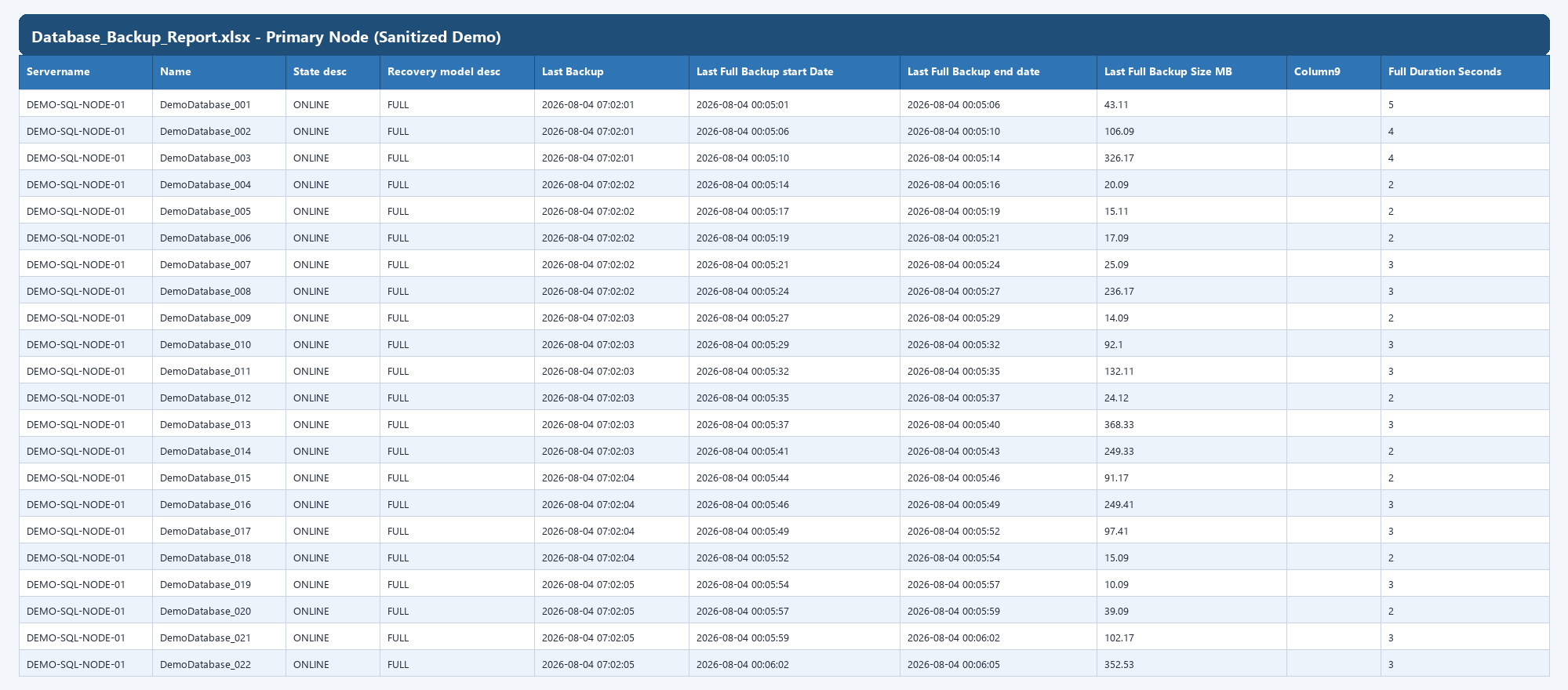
| Primary Node Backups | Primary replica | Non-AG / standalone databases |
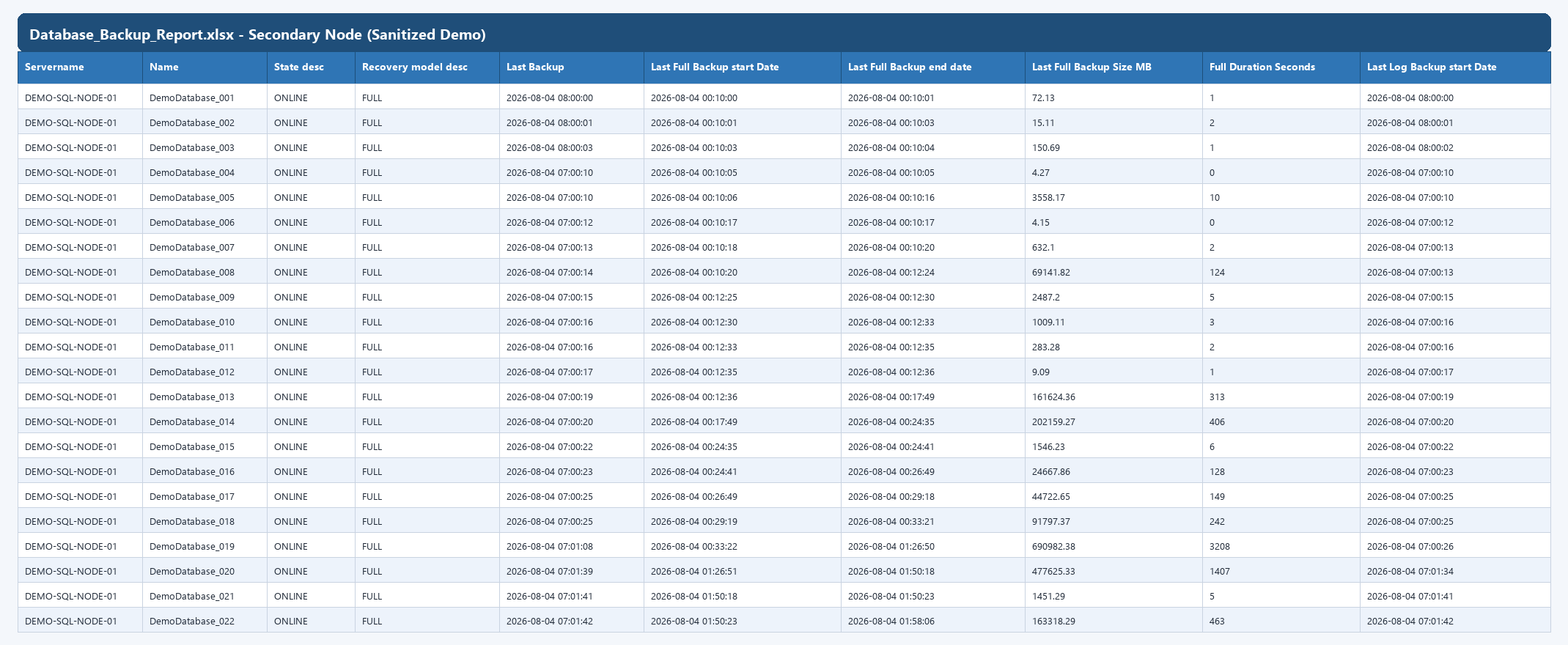
| Secondary Node Backups | Secondary replica | AG-synchronized databases |
This gives a single file where a DBA can audit 100% of the estate — whether a database is AG-enrolled or not — without needing to log into two servers or reconcile two separate reports.
Architecture with SSRS layer
Screenshots
All screenshots below are from a sanitized demo export of Database_Backup_Report.xlsx.
Server names and database names were replaced with generic placeholders.
Primary Node tab (non-AG / standalone databases):
Secondary Node tab (AG-synchronized databases):
Lessons Learned
The main insight from building this was how often "backup completed successfully" and "backup is restorable" turned out to be different questions in practice - especially after storage or configuration changes. Automating the restore-and-check cycle turned backup validation from a manual, easy-to-skip task into something that runs whether or not anyone remembers to check.
On the reporting side, the AG split was the key challenge: backup history for AG databases
lives exclusively in the secondary's msdb, so any single-connection report silently misses
half the estate. Using two SSRS data sources and filtering by group_database_id to separate
the two populations was the cleanest solution — no linked servers, no cross-node joins, and
the output stays in one familiar Excel file.