
The Time a Team Lead Asked 'What Changed in the Database?' and I Built a Schema Change Audit Trigger
So this one starts the way most of my "let me build something real quick" projects start: someone walks up to my desk looking mildly stressed.
A team lead comes over and goes, basically, "Hey man, I've got a customer asking exactly what changed in the database after last night's deployment - which stored procs, which tables, which functions - and I genuinely can't tell them. I don't have a straight answer and it's making us look bad." And look, I get it. "Something changed" is not an answer a customer wants to hear. They want specifics: which object, what changed in it, when, and by whom.
Now, to be fair, there are proper tools built exactly for this - Redgate has deployment automation and schema comparison products that do a very solid job of this kind of thing, and if your shop already has budget and buy-in for that, great, use it. But this was a "I need something today, and I need it to just live on the server itself" kind of situation. No new tooling to procure, no agents to install, nothing to explain to procurement. Just: track every schema change, keep the before and after, and let it sit there quietly until someone needs it.
So I built a database-level DDL trigger. It logs CREATE/ALTER/DROP on tables, procedures,
functions, and views - and critically, it stores both the old definition and the new
definition, not just "something changed." That's the whole point. When the question comes in
weeks later, someone can query the log table, or I can literally export it and email it as an
attachment, or walk over to someone's desk and pull it up live. No guessing, no "let me check with
the dev team and get back to you."
The core problem with DDL triggers (and why you need a side table)
Here's the thing that trips people up the first time they try this: SQL Server's EVENTDATA()
inside a DDL trigger gives you the new state of an object beautifully - the new T-SQL command,
the new schema, the new object name. What it does not give you, out of the box, is the
previous definition. By the time your trigger fires on an ALTER PROCEDURE, the old version of
that procedure is already gone from sys.sql_modules - it's been overwritten.
So if you only rely on EVENTDATA(), you get a log that says "this procedure was altered at
2:32 PM" with zero context on what it actually used to look like. That's only half useful. To
actually answer "what changed," you need the diff - old vs. new - and that means you have to keep
your own running cache of "the last known definition of every object," updated every time this
trigger fires, so that the next time something changes, you've still got the previous version
sitting there to compare against.
That's exactly what I did: one table logs history (DDLChangeLog), and a second table acts as a
rolling cache of current definitions (ObjectDefinitionsCache) that the trigger reads from
before it updates it.
That cache table is the whole trick. Without it, you're stuck with "an event happened." With it, you get "here's exactly what this proc looked like before, and here's what it looks like now" - which is the actual answer people are asking for.
The trigger itself
Here's the trigger, trimmed down to the shape of it (names below are generic/demo - swap in your own log database and table names):
CREATE TRIGGER [trg_DDLChangeAudit]
ON DATABASE
FOR
    CREATE_TABLE, ALTER_TABLE, DROP_TABLE,
    CREATE_PROCEDURE, ALTER_PROCEDURE, DROP_PROCEDURE,
    CREATE_FUNCTION, ALTER_FUNCTION, DROP_FUNCTION,
    CREATE_VIEW, ALTER_VIEW, DROP_VIEW
AS
BEGIN
    SET NOCOUNT ON;

    DECLARE
        @eventData XML,
        @eventType NVARCHAR(100),
        @schemaName NVARCHAR(256),
        @objectName NVARCHAR(256),
        @objectType NVARCHAR(100),
        @tsql NVARCHAR(MAX),
        @oldText NVARCHAR(MAX),
        @newText NVARCHAR(MAX),
        @oldXml XML,
        @newXml XML;

    -- Step 1: What just happened, straight from EVENTDATA()
    SET @eventData  = EVENTDATA();
    SET @eventType  = @eventData.value('(/EVENT_INSTANCE/EventType)[1]', 'NVARCHAR(100)');
    SET @schemaName = @eventData.value('(/EVENT_INSTANCE/SchemaName)[1]', 'NVARCHAR(256)');
    SET @objectName = @eventData.value('(/EVENT_INSTANCE/ObjectName)[1]', 'NVARCHAR(256)');
    SET @objectType = @eventData.value('(/EVENT_INSTANCE/ObjectType)[1]', 'NVARCHAR(100)');
    SET @tsql       = @eventData.value('(/EVENT_INSTANCE/TSQLCommand)[1]', 'NVARCHAR(MAX)');

    -- Step 2: Pull whatever we had cached as the "old" version
    SELECT
        @oldText = DefinitionText,
        @oldXml  = DefinitionXml
    FROM AuditDb.dbo.ObjectDefinitionsCache
    WHERE ObjectType = @objectType
      AND SchemaName = @schemaName
      AND ObjectName = @objectName;

    -- Step 3: Get the NEW definition, depending on object type
    IF @eventType LIKE 'CREATE_%' OR @eventType LIKE 'ALTER_%'
    BEGIN
        IF @objectType IN ('PROCEDURE','FUNCTION','VIEW')
        BEGIN
            SELECT @newText = sm.definition
            FROM sys.objects o
            JOIN sys.schemas s ON o.schema_id = s.schema_id
            LEFT JOIN sys.sql_modules sm ON o.object_id = sm.object_id
            WHERE s.name = @schemaName AND o.name = @objectName;

            SET @newXml = TRY_CONVERT(XML,
                CONCAT('<def><![CDATA[', ISNULL(@newText, @tsql), ']]></def>'));
        END
        ELSE IF @objectType = 'TABLE'
        BEGIN
            -- For tables we snapshot the column list instead of raw T-SQL,
            -- since ALTER TABLE commands don't tell the whole story on their own.
            SELECT @newXml = (
                SELECT c.name AS ColumnName,
                       TYPE_NAME(c.user_type_id) AS DataType,
                       c.max_length AS MaxLength,
                       c.is_nullable AS IsNullable,
                       c.column_id AS ColumnOrder
                FROM sys.columns c
                WHERE c.object_id = OBJECT_ID(@schemaName + '.' + @objectName)
                ORDER BY c.column_id
                FOR XML PATH('Column'), ROOT('TableSchema'), TYPE
            );
            SET @newText = CONVERT(NVARCHAR(MAX), @newXml);
        END
    END
    ELSE IF @eventType LIKE 'DROP_%'
    BEGIN
        SET @newXml = TRY_CONVERT(XML, CONCAT('<def><![CDATA[', ISNULL(@tsql,''), ']]></def>'));
        SET @newText = NULL;
    END

    -- Step 4: Log the change - old AND new, side by side
    INSERT INTO AuditDb.dbo.DDLChangeLog
        (EventTime, EventType, ObjectType, SchemaName, ObjectName,
         LoginName, HostName, EventData, OldDefinitionXML, NewDefinitionXML)
    VALUES
        (SYSUTCDATETIME(), @eventType, @objectType, @schemaName, @objectName,
         ORIGINAL_LOGIN(), HOST_NAME(), @eventData, @oldXml, @newXml);

    -- Step 5: Keep the cache current for the NEXT change
    IF @eventType LIKE 'DROP_%'
    BEGIN
        DELETE FROM AuditDb.dbo.ObjectDefinitionsCache
        WHERE ObjectType = @objectType AND SchemaName = @schemaName AND ObjectName = @objectName;
    END
    ELSE IF EXISTS (
        SELECT 1 FROM AuditDb.dbo.ObjectDefinitionsCache
        WHERE ObjectType = @objectType AND SchemaName = @schemaName AND ObjectName = @objectName
    )
    BEGIN
        UPDATE AuditDb.dbo.ObjectDefinitionsCache
        SET DefinitionText = COALESCE(@newText, @tsql),
            DefinitionXml  = @newXml,
            LastModified   = SYSUTCDATETIME()
        WHERE ObjectType = @objectType AND SchemaName = @schemaName AND ObjectName = @objectName;
    END
    ELSE
    BEGIN
        INSERT INTO AuditDb.dbo.ObjectDefinitionsCache
            (ObjectType, SchemaName, ObjectName, DefinitionText, DefinitionXml, LastModified)
        VALUES
            (@objectType, @schemaName, @objectName, COALESCE(@newText, @tsql), @newXml, SYSUTCDATETIME());
    END
END;
A couple of details worth calling out, because they're the parts that actually matter in practice:
ORIGINAL_LOGIN()andHOST_NAME()get captured on every row. This turned out to be just as important as the schema diff itself - "who ran this and from which machine" answers the follow-up question that always comes right after "what changed," which is "wait, who did that?"- Tables get special handling. For procs/functions/views,
sys.sql_modules.definitiongives you the full object text, easy diff. ButALTER TABLEdoesn't hand you a clean "here's the full new table shape" - so instead of trying to parse the raw T-SQL, I snapshot the column list straight fromsys.columnsas XML. That gives a clean structural diff (column added, type changed, nullability flipped) instead of trying to reverse-engineer intent from a fragment ofALTER TABLE ... ADD ...text. - The cache table isn't optional. It's tempting to skip it and think "I'll just log
EVENTDATA()and figure out the old value later." You can't - the old value is gone the moment theALTERcommits. The cache has to be written every single time the trigger fires, or the chain breaks and the next change has nothing to diff against.
What it actually looks like when someone queries it
This is the part I actually show people. Someone asks "what changed after Friday's deployment," and instead of me digging through deployment scripts or asking three different devs, I run:
SELECT TOP 6 *
FROM AuditDb.dbo.DDLChangeLog
ORDER BY EventTime DESC;
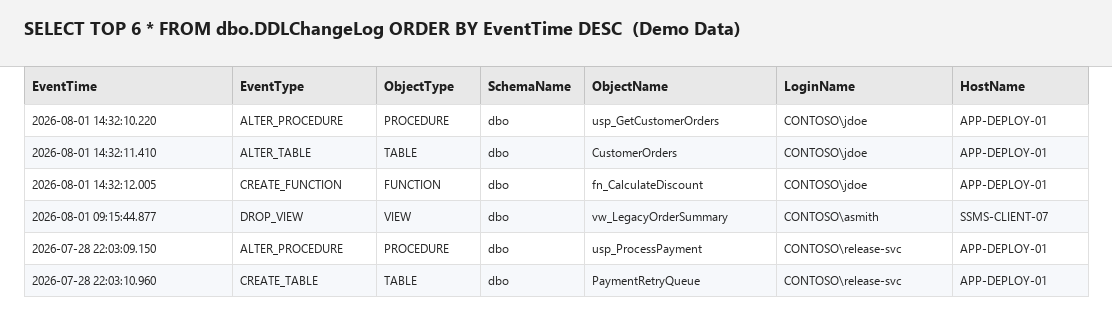
And when someone wants the actual diff on a specific procedure - not just "it was altered," but
"what exactly moved" - I pull OldDefinitionXML and NewDefinitionXML for that row side by side:
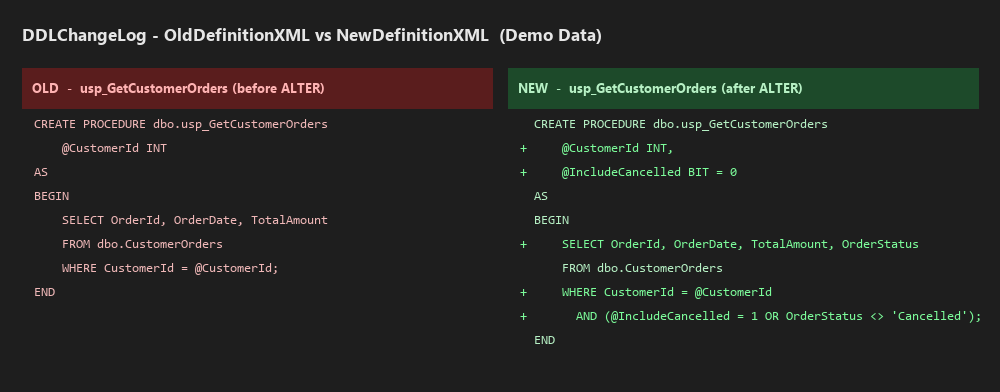
(Both screenshots above use fabricated demo data - generic server names, generic logins, and a made-up stored procedure. Same idea applies to your real environment.)
That right there is the whole pitch. Someone added a parameter and a filter condition to a procedure - visible, dated, attributed to a login and a host. No more "let me get back to you."
How this actually gets used day to day
- Post-deployment sanity check. After a release window, someone runs the log filtered to the deployment time window and gets a clean list of exactly what shipped - not what the release notes said shipped, what the server says actually changed.
- "Email it to the customer." Export the grid, attach it, done. It's not fancy, but it's a literal server-generated record, which carries more weight than a manually typed change list.
- The "wait, who dropped that view?" conversation. Because every row has
LoginNameandHostName, the "who did this" question stops being a mystery. This has saved more than one finger-pointing meeting from going nowhere. - Drift detection between what a script says it does and what actually happened. Deployment
scripts occasionally do more (or less) than advertised - a leftover
DROPa dev forgot to comment out, a table alter that wasn't in the change ticket. The trigger doesn't care what the ticket says; it logs what the server actually did.
Where I'd take this further
This solved the immediate problem, but sitting back and looking at it honestly, there's more I'd want before calling it a finished platform rather than a solid stopgap:
- Retention and archiving. A busy database with frequent deployments will pile up rows in
DDLChangeLogover time. I'd add a purge/archive job so the table doesn't grow forever, keeping full detail for a rolling window (say, 12 months) and summarized data beyond that. - Automatic email/Teams alert on schema changes outside a maintenance window. Right now this is a "pull" tool - someone has to go query it. The natural next step is a scheduled job that checks for any DDL events outside the approved deployment window and pings a channel automatically, turning this into a "push" alerting system instead of a lookup table.
- A lightweight report on top of it, similar in spirit to the backup validation report I built elsewhere - something that renders the diff in an actual readable format (real line-by-line diff highlighting, not raw XML) instead of requiring someone to manually pull two XML columns apart.
- Cross-database rollup, if this needs to run on more than a handful of databases - right now it's one trigger per database logging to a shared audit database, which works fine at moderate scale, but a central dashboard pulling from multiple instances would make more sense past a certain number of servers.
- Comparing against Redgate-style tooling. If budget and process allow for a proper schema comparison/deployment automation tool, that's genuinely the more complete answer long term. This trigger is the "I need visibility today, on the box, for free" version - not a replacement for a mature deployment pipeline, just a very effective stand-in until one exists.
The actual takeaway
Nobody enjoys the "we don't actually know what changed" conversation, and it's a genuinely bad look in front of a customer. The fix here wasn't complicated - it's a database trigger and two tables - but the part that made it useful instead of just "technically logging something" was making sure the old value was captured, not just the new one. A change log that only tells you that something happened is trivia. A change log that tells you exactly what it used to say and what it says now is an actual answer to the question someone's customer is asking.