
The Time I Set Up a Deadlock Alert That Emails You the Actual Deadlock Graph
This one's from a few years back, but it's still one of my favorite "small plumbing, big payoff" setups. The ask was simple on the surface: "can we get notified when a deadlock happens?" Sure, easy - SQL Server can alert on that natively. But the follow-up question is the one that actually matters: notified with what? "A deadlock happened at 2:14 AM" is technically true and completely useless. Nobody can do anything with that sentence. What people actually need to fix a deadlock is the deadlock graph itself - which process was the victim, which process was holding what lock, and the exact T-SQL each side was running.
So that was the goal: the second a deadlock fires, someone should get an email in their inbox with the real deadlock XML sitting right there as an attachment, ready to open in SSMS's deadlock graph viewer. No digging through logs, no asking "hey did anyone see a deadlock alert," no logging into the server at all if you don't want to.
The three moving pieces
This is built from three parts that only work because they hand off to each other in sequence:
- An Extended Events session that's always running in the background, quietly capturing the full XML of every deadlock the instance produces.
- A SQL Server Agent Alert tied to the
Number of Deadlocks/secperformance counter, so the moment that counter ticks above zero, SQL Server itself fires a response. - A stored procedure that the alert's response job calls, which reads the freshly captured deadlock XML out of the event file, logs it to a permanent table for history, and fires off the email with the XML attached.
Piece 1: the Extended Events session
Nothing fancy here - this is the standard way to capture deadlocks without the overhead of the
old deprecated trace flags. It just sits there running (STARTUP_STATE=ON, so it survives a
restart) and writes each deadlock's full XML report to a rotating file target:
CREATE EVENT SESSION [Collect-Deadlock] ON SERVER
ADD EVENT sqlserver.xml_deadlock_report(
    ACTION(
        package0.collect_system_time,
        sqlos.task_time,
        sqlserver.client_app_name,
        sqlserver.client_hostname,
        sqlserver.database_id,
        sqlserver.is_system,
        sqlserver.username
    )
)
ADD TARGET package0.event_file(
    SET filename = N'Collect-Deadlock.xel',
        max_file_size = (100),
        max_rollover_files = (10)
)
WITH (
    MAX_MEMORY = 4096 KB,
    EVENT_RETENTION_MODE = ALLOW_SINGLE_EVENT_LOSS,
    MAX_DISPATCH_LATENCY = 20 SECONDS,
    MAX_EVENT_SIZE = 0 KB,
    MEMORY_PARTITION_MODE = NONE,
    TRACK_CAUSALITY = OFF,
    STARTUP_STATE = ON
);
GO
The max_rollover_files = 10 bit matters in production - deadlocks tend to cluster (one bad query
plan can cause a burst of them), and you don't want the very first file to get overwritten before
your alert job has had a chance to read it.
Piece 2: the SQL Agent Alert
This is the part people forget SQL Server can just do natively - no polling job needed to detect
a deadlock. SQL Server Agent can watch the SQLServer:Locks performance object directly and fire
the moment the counter moves:
Alert type:   SQL Server Performance Condition Alert
Object:       SQLServer:Locks
Counter:      Number of Deadlocks/sec
Instance:     _Total
Condition:    rises above 0

Response:     Execute job "Deadlock Alert"
And the "Deadlock Alert" job itself is deliberately tiny:
WAITFOR DELAY '00:00:20';
EXEC DBATools.dbo.sp_deadlock_extended_events;
That 20-second delay isn't decoration - it's there because MAX_DISPATCH_LATENCY = 20 SECONDS on
the event session means the deadlock XML might not be flushed to the file yet the instant the
performance counter ticks. Skip the delay and you risk the stored procedure running a beat too
early and finding nothing to read. This was one of those "why is my job sometimes missing the very
deadlock that triggered it" moments before I added the wait.
Piece 3: the stored procedure - read, parse, log, email
This is where most of the actual work happens, and it's worth walking through in order because each step solves a specific problem.
Step A - pull unprocessed deadlocks out of the event file. sys.fn_xe_file_target_read_file
reads straight from the .xel files (the * wildcard picks up all rollover files), filtered down
to just the deadlock report events:
CREATE TABLE #DeadLockXMLData (DeadLockXMLData XML, DeadLockNumber INT);
CREATE TABLE #DeadLockDetails (
    ProcessID VARCHAR(50), HostName VARCHAR(50), LoginName VARCHAR(100),
    ClientApp VARCHAR(100), Frame NVARCHAR(MAX), TSQLString NVARCHAR(MAX),
    DeadLockDateTime DATETIME, IsVictim TINYINT, DeadLockNumber INT
);

INSERT INTO #DeadLockXMLData (DeadLockXMLData, DeadLockNumber)
SELECT TOP 20
    CONVERT(XML, event_data),
    ROW_NUMBER() OVER (ORDER BY object_name)
FROM sys.fn_xe_file_target_read_file(N'Collect-Deadlock*.xel', NULL, NULL, NULL)
WHERE object_name = 'xml_deadlock_report'
ORDER BY 2 DESC;
Step B - loop through each deadlock and parse it with OPENXML. A single burst can produce
multiple deadlock events, so this cursors through all of them rather than assuming there's only
one:
DECLARE @DeadLockXMLData XML, @DeadLockNumber INT, @Document INT;
DECLARE curDeadlocks CURSOR FOR
    SELECT DeadLockXMLData, DeadLockNumber FROM #DeadLockXMLData;

OPEN curDeadlocks;
FETCH NEXT FROM curDeadlocks INTO @DeadLockXMLData, @DeadLockNumber;

WHILE @@FETCH_STATUS = 0
BEGIN
    EXEC sp_xml_preparedocument @Document OUTPUT, @DeadLockXMLData;

    INSERT INTO #DeadLockDetails
        (ProcessID, HostName, LoginName, ClientApp, Frame, TSQLString, DeadLockDateTime, DeadLockNumber)
    SELECT ProcessID, HostName, LoginName, ClientApp, Frame, TSQL, LastBatchCompleted, @DeadLockNumber
    FROM OPENXML(@Document, 'event/data/value/deadlock/process-list/process')
    WITH (
        ProcessID  VARCHAR(50)   '@id',
        HostName   VARCHAR(50)   '@hostname',
        LoginName  VARCHAR(50)   '@loginname',
        ClientApp  VARCHAR(50)   '@clientapp',
        TSQL       NVARCHAR(4000) 'inputbuf',
        Frame      NVARCHAR(4000) 'executionStack/frame',
        LastBatchCompleted NVARCHAR(50) '@lastbatchcompleted'
    );

    -- Flag whichever process SQL Server picked as the victim, so it's
    -- visually distinct from the process that "won" and kept running.
    UPDATE #DeadLockDetails
    SET IsVictim = 1
    WHERE ProcessID IN (
        SELECT ProcessID
        FROM OPENXML(@Document, 'event/data/value/deadlock/victim-list/victimProcess')
        WITH (ProcessID VARCHAR(50) '@id')
    );

    EXEC sp_xml_removedocument @Document;
    FETCH NEXT FROM curDeadlocks INTO @DeadLockXMLData, @DeadLockNumber;
END

CLOSE curDeadlocks;
DEALLOCATE curDeadlocks;
Step C - log it permanently, but only the new stuff. Since the event file can be re-read on a later run (rollover files stick around for a while), I dedup against what's already logged so the same deadlock doesn't get inserted twice:
INSERT INTO DBATools.dbo.DeadlockDetails
SELECT * FROM #DeadLockDetails d
WHERE NOT EXISTS (
    SELECT 1 FROM DBATools.dbo.DeadlockDetails dd WHERE d.ProcessID = dd.ProcessID
);
Step D - get the raw XML out to a file, and email it. This is the step that took a couple of
iterations to get right. My first attempt just queried a summary (victim T-SQL vs. blocking T-SQL
as text columns) and sent that as the attachment via sp_send_dbmail's
@attach_query_result_as_file option - readable, but it lost the actual graph structure, and
anyone debugging it still had to reconstruct the deadlock shape from a paragraph of text. What
people actually wanted was the real XML they could drop into SSMS and get the visual deadlock
graph, resource nodes and all. So the final version exports the true XML using bcp and attaches
that file instead:
DECLARE @query NVARCHAR(MAX) = N'
    SET NOCOUNT ON;
    SELECT CONVERT(XML, a.DeadLockXMLData)
    FROM (
        SELECT TOP 1 CONVERT(XML, event_data) AS DeadLockXMLData,
               ROW_NUMBER() OVER (ORDER BY object_name) AS DeadLockNumber
        FROM sys.fn_xe_file_target_read_file(N''Collect-Deadlock*.xel'', NULL, NULL, NULL)
        WHERE object_name = ''xml_deadlock_report''
        ORDER BY 2 DESC
    ) a';

DECLARE @sql VARCHAR(8000) =
    'bcp "' + @query + '" queryout "D:\DBAlerts\Deadlocks\LatestDeadlock.xml" -c -t"*|*" -T';

EXEC master..xp_cmdshell @sql;

DECLARE @servername NVARCHAR(150) = @@SERVERNAME;
DECLARE @mysubject  NVARCHAR(200) = 'Deadlock Alert with XML - ' + @servername;

EXEC msdb.dbo.sp_send_dbmail
    @profile_name = 'SQL Server DB Alerts',
    @recipients   = N'[email protected]',
    @subject      = @mysubject,
    @body         = 'PFA',
    @file_attachments = 'D:\DBAlerts\Deadlocks\LatestDeadlock.xml';
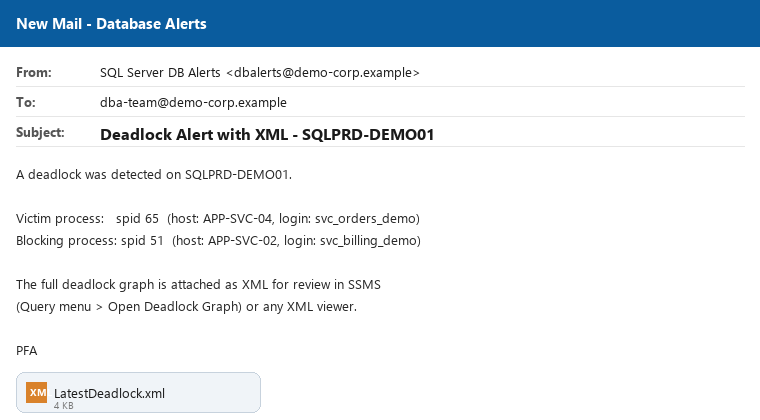
And that's the email that actually lands - subject line with the server name baked in, and the real deadlock graph XML sitting there as an attachment:
Open that XML in SSMS (Query menu > Open Deadlock Graph, or just double-click a .xdl-renamed
copy) and you get the classic picture - two processes, each holding the resource the other one
needs:
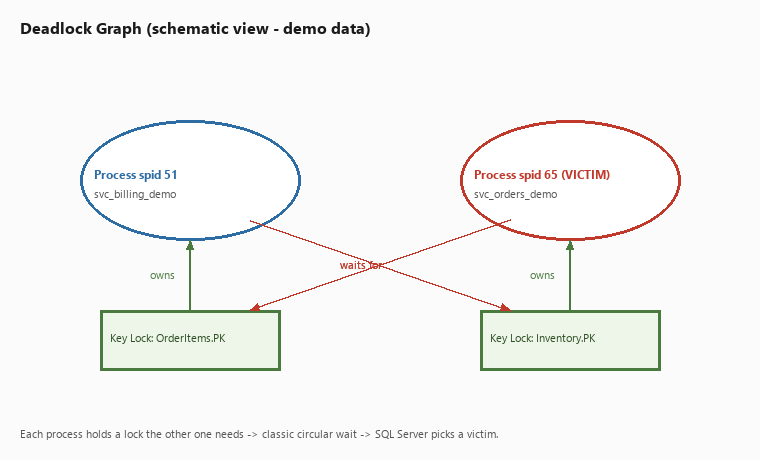
(Both images use fabricated demo data - generic server, host, and login names. The real schema and code are unchanged above.)
Things I'd flag or do differently today
I built this a few years back, and looking back at it honestly, there are a few things in here I wouldn't ship as-is today, and I'd rather call them out than pretend the script is perfect:
xp_cmdshellis a real attack surface. Usingbcpviaxp_cmdshellto dump the XML to disk works, butxp_cmdshellshells out to the OS, and it should be enabled only on instances where that's genuinely locked down and audited - not left on by default. If I rebuilt this today, I'd look at generating the file with PowerShell called from the Agent job step instead (aCmdExecjob step type), keepingxp_cmdshelloff entirely.- Hardcoded recipients and profile names. The mail profile and recipient list are baked straight into the procedure. Moving those into a small config table (or SQL Agent job step parameters) makes it a lot easier to update the distribution list without editing and redeploying the stored procedure itself.
- Dedup by
ProcessIDalone is a little fragile. SPIDs get reused constantly, so two unrelated deadlocks days apart could theoretically share aProcessIDand get treated as duplicates. In practice this hasn't bitten me, but pairing it withDeadLockDateTimein theNOT EXISTScheck would be the safer version. - No retention/cleanup on
DeadlockDetails. Same story as most audit tables I've built - it grows forever unless something prunes it. I'd add a purge job for anything older than a defined window. - The commented-out first attempt is still in the file, which is honestly very "real DBA script energy" - I kept it there as a note to future-me about why the final version looks the way it does, rather than cleaning it up. Sometimes the commented-out failed attempt is more useful documentation than a clean comment would have been.
Why this was worth building
The instinct to "just get an alert when X happens" is usually only half the job. The alert itself is easy - SQL Server's had performance condition alerts forever. The part that actually helps someone at 2 AM is making sure the evidence travels with the notification, not just the fact that something went wrong. A deadlock alert that says "a deadlock happened, good luck" gets ignored after the third time. A deadlock alert that hands you the actual graph, the victim, and the blocking query - ready to open - gets used.